
What AI sales coaching tools do
AI sales coaching is software that reviews a rep's sales calls, scores them, and lets the rep practise against an AI buyer. A manager still decides what each rep works on, and whether the practice sticks.
You manage a handful of reps, and on a good week you listen to two of their calls each. AI coaching tools are built to cover the rest. Strip the marketing away and they do five jobs:
- They analyse calls: record, transcribe and score each one against a checklist you set, like "asked about budget" or "agreed a next step".
- They give feedback on how the rep talks, such as how long the rep talked compared with the buyer, how many questions they asked and how fast they spoke.
- They run roleplay, where the rep practises a cold call or a price objection with an AI playing the buyer and gets a score and notes at the end.
- They prompt the rep during a live call, with the question to ask or the point they skipped.
- They suggest next steps after a real call, by drafting the follow-up or naming what the rep should do before the next meeting.
What five tools say they do, from their own sites:
- Gong Enable has an AI Call Reviewer that scores calls automatically, an AI Trainer that turns past calls into roleplay scenarios, and a coaching inbox that keeps a manager's feedback and tasks in one place.
- Hyperbound runs roleplays with AI buyers built around your sales process, records and scores real calls to spot coaching gaps, and offers coaching during live calls.
- Second Nature runs AI roleplays with avatars for discovery calls, objection handling and cold calls.
- Yoodli runs AI roleplays for sales training and onboarding, with feedback after each practice and certifications.
- Mindtickle pairs its AI with coaching forms and templates for managers, and coaching backed by skill, performance and deal insights.
Check prices and plans on each tool's own site. For tools that do other sales jobs, see AI sales tools.
Call review, practice or a coaching program: the three kinds
Most tools lean on one of three approaches. Some sell two. Knowing which one you're buying matters more than any feature list, because each works from different material:
| Kind | Works from | Good for | Blind spot |
|---|---|---|---|
| Call review | Recorded calls and meetings | Finding which calls to hear, and patterns across many | Calls that were never recorded |
| Practice | A scenario you write | Rehearsing a skill before a real buyer hears it | An AI buyer is easier to read than a real one |
| Coaching program | Forms, session notes and goals a manager keeps | Making one skill stick over a month | Needs your time every week |
Call review tells you what happened. Practice gets the rep ready for what happens next. A coaching program is the part that connects the two, and it's the one a tool can't do without you. Gong Enable and Hyperbound, by their own descriptions, both review calls and run practice. Mindtickle puts more weight on the manager's side.
If your reps sell by phone calls nobody records, or in WhatsApp chats and face-to-face meetings, a call review tool has nothing to read. Practice still works, because the rep brings the material.
Which outputs to trust, and which to check
AI coaching output falls into three groups. Treat each one differently.
| Output | Trust it for | How to check it |
|---|---|---|
| Talk time, question count, speaking pace | Spotting a pattern across ten calls | Listen to one call where the number looks odd |
| Checklist scores ("asked about budget: yes") | Finding which calls to listen to | Read the transcript around the moment it scored |
| Summaries and suggested next steps | A first draft for the rep | Have the rep read it before it goes to the client or the CRM |
| "This deal is at risk" or "this rep needs work on X" | A prompt to look closer | Use your own judgment, then talk to the rep |
Counts are the part to trust most, since a transcript either has a question in it or it doesn't. Judgments are where the tools slip, and a tool can mark a rep down for not asking about budget on a call where the buyer said the budget in the first minute.
What still needs a manager
However good the scores get, four things stay with you.
- Picking the one thing. A scorecard can list eight weak spots. A rep can work on one. Choosing which one, for this rep this month, is your job.
- Knowing the context. The AI doesn't know the rep's mum is in hospital, that the territory changed, or that the buyer on Tuesday's call was always going to say no.
- Making it stick. Feedback from a tool is easy to ignore. A manager who asks "how did the new opener go this week?" is harder to ignore.
- Deal judgment. Whether to push on price, walk away or bring in help is still a call a person makes.
Turn coaching into weekly practice
AI coaching fails when it's a login reps open once a month, and it works when it has a fixed place in the week, on the same days and in the same shape. Here's a routine that fits a team of 5 to 15 reps.
- Monday, 10 minutes: every rep does one roleplay on this month's skill, like handling "we're already using someone".
- Midweek, 15 minutes each: you listen to one real call per rep, picked from the tool's scores. Pick the call that scored oddly, high or low.
- Friday, 20 minutes: a short 1:1 with each rep. Look at the roleplay, the real call and one number. Agree one thing to try next week. The 1 on 1 meeting template has an agenda to start from.
- Month end: check whether the number moved. If it did, pick the next skill. If it didn't, keep this one for another month.
One skill a month per rep. You don't need twelve training topics. You need a short list of the things that lose your team deals, worked through in order.
Made-up example: a manager runs 8 reps. From the call scores, she sees that most first calls end without a booked next meeting. That becomes March's skill: close every first call with a date.
Each Monday the reps roleplay the last five minutes of a first call against the AI buyer. Midweek she listens to one real first call per rep, which takes her two hours. On Friday each rep gets a 20-minute 1:1.
In February, 11 of the team's 40 first calls ended with a next meeting booked, and by the last week of March it's 19 of 42. Two reps haven't moved, so they keep the skill in April while the rest move on to price. The numbers are invented, so count your own before and after.
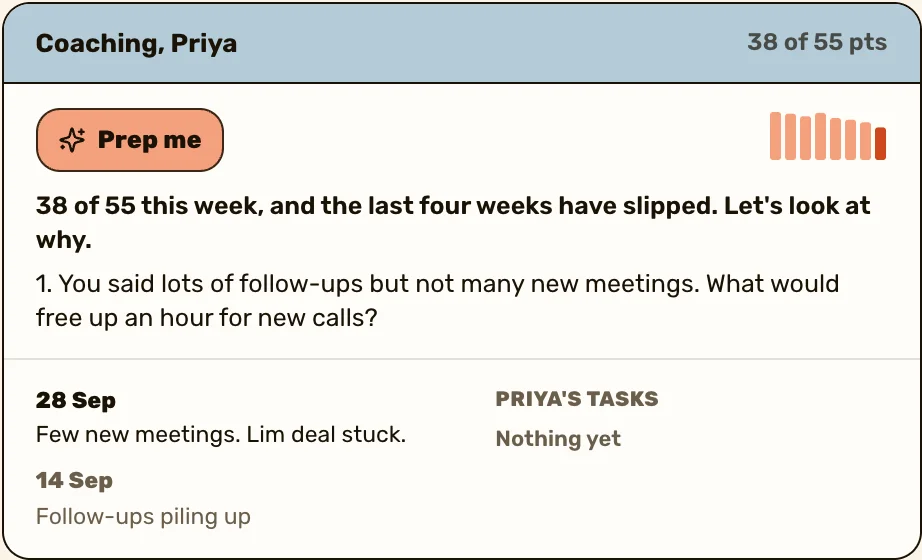
The AI does the practice. The 1:1 is still yours. ActivityTracker drafts your 1:1 prep with AI, keeps every session's notes on the rep's page and sends action items into their task list.
See how coaching worksHow to choose an AI sales coaching tool
Start from the job you need done and the place your team sells, then look at features. Six questions, in this order:
- Where do your conversations happen? Recorded video calls suit call review. Unrecorded phone calls, WhatsApp chats and meetings in person leave call review with nothing to read, so start with practice.
- Which one skill are you fixing first? Ask the vendor to show you a practice scenario for that skill, built for your product, in the demo.
- Can reps practise before anyone sees their scores? A rep who knows the first try is private will try more often.
- Where does the feedback land? If it stays inside the coaching tool, it needs a fixed slot in your 1:1, or nobody opens it.
- What does it record, and who is told? Your buyers need to know a call is recorded, and your country's rules on that apply whatever the tool does.
- What does it cost per rep, and is there a minimum number of seats? Read it on the vendor's own pricing page, not in a list of tools.
Then trial the one that passes, on one skill, with two or three reps who volunteer. Run it with the two-week plan below.
Can you start with a general AI assistant?
Yes, for practice. A general AI assistant can play a buyer if you tell it who the buyer is, and it costs nothing extra if your team already has one. Give it three things:
- Who the buyer is: their job, what they use today, and the objection to practise, like "we're happy with our current supplier".
- The rules: stay in character, push back twice before giving ground, and keep each reply to two sentences.
- How to score: after ten turns, mark the rep against your checklist and name one thing to try next time.
The rep types or speaks the replies. The score comes at the end. Copy a starting prompt from AI sales prompts.
It has limits. A general assistant never hears your real calls, and it forgets last week's practice unless you paste it in. Its scores are judgments, so check them the way the trust table says. Keep client names and numbers out of anything you paste. When the team practises every week and wants call review too, that's the point to look at a dedicated tool.
When reps feel watched
Some reps will hear "AI records and scores every call" as "my manager is building a file on me". That's a fair worry, and ignoring it kills adoption.
- Say why before you switch it on. The tool is there to help them practise and to save you guessing, and it isn't a ranking.
- Let reps see their own scores first, before you do. Some tools let them practise privately.
- Coach from the tool and never discipline from it. If a score shows up in a performance review with no conversation before it, trust is gone.
- Use it on your own calls too, if you still sell. Reps notice.
- Tell buyers you're recording and follow your country's rules on it.
To hold reps to their numbers without it feeling like surveillance, use the sales accountability guide. For the 1:1 conversation itself, see sales coaching techniques.
How to start in two weeks
- Pick one skill the whole team is weak at. If you're not sure which, read through last month's lost deals and look for the step where most of them stalled.
- Trial one tool on that skill only, with two or three reps who volunteer.
- Count one number before and after, like first calls that end with a booked meeting.
- Keep your 1:1s exactly as they are. Add the tool's output to them, and don't replace them with it.
- After two weeks, ask the volunteers whether they'd keep it. If they wouldn't, don't roll it out to the rest.
Keep reading
- 1 on 1 meeting template
- Sales accountability without micromanagement
- 1 on 1 agenda generator


Questions people ask
Software that records and scores sales calls, gives feedback on things like talk time and questions, and lets reps practise with an AI buyer. A manager still decides what each rep works on.
No. It can score calls and run practice, but it can't pick the one thing a rep should work on, know the context behind a bad call, or make the practice stick.
Counts like talk time and questions asked are reliable. Judgments like "missed the budget question" are often wrong, so listen to the call before you act on one.
Call review scores calls that already happened, from recordings. Roleplay is practice: the rep rehearses a skill against an AI buyer before a real buyer hears it.
Explain why before you start, let reps see their own scores first, and never use a score in a review without talking to them about it first.
Every week, in short sessions. Ten minutes on Monday, on the skill you're working on that month, is enough to start.
Sources
- Gong, Gong Enable, read 25 October 2026
- Hyperbound, AI sales roleplay and coaching platform, read 25 October 2026
- Second Nature, AI role play sales training software, read 25 October 2026
- Yoodli, AI roleplays for sales training, onboarding and L&D, read 25 October 2026
- Mindtickle, Sales coaching software, read 25 October 2026