
Two products under one name
WhatsApp Business is WhatsApp's name for the ways a business can talk to customers on WhatsApp. For a seller, two of them matter. The WhatsApp Business app is a free app for one business number, and you use it on your phone the way you use normal WhatsApp. The WhatsApp Business Platform, which developers call the WhatsApp API, is a paid service that lets software send and receive messages on a business number, usually through a vendor's inbox or chatbot. WhatsApp's own comparison adds a third, ads on Facebook and Instagram that open a WhatsApp chat.
Most people searching "WhatsApp Business" want the app. Most vendors selling "WhatsApp Business" are selling the platform, and that mix-up costs small sellers money every month.
What the WhatsApp Business app adds
Open the Business app and it looks almost the same as the WhatsApp you already use. What changes is the set of tools on top, listed on WhatsApp's features page:
| Feature | What it does | When a seller uses it |
|---|---|---|
| Business profile | Your logo, a description, opening hours and your website | Every new chat, since it's the first thing a stranger checks |
| Greeting message | An automatic welcome when someone writes for the first time | Enquiries from a listing, an ad or your name card |
| Away message | An automatic reply outside the hours you set | Evenings and weekends, so nobody waits in silence |
| Quick replies | Shortcuts for the messages you send most | Your price, your address, how booking works |
| Labels | Tags you add to chats, then filter by | "New", "quote sent", "follow up" |
| Catalogue | Your products or services, browsable inside the chat | Fewer "can you send photos?" messages |
| Short links and QR codes | Ways to open a chat with you without saving your number | Your website, your bio, a flyer |
| Broadcasts | One message sent privately to many customers at once | A new listing or a holiday closing, to people who asked to hear |
The app is free to download and runs on your phone's data or Wi-Fi, like the normal app. The same comparison page says the app provides for one phone number, and points a larger business that needs many users on one number to the platform. Business Broadcasts, a newer version, adds scheduling and buttons like Book and Call, and WhatsApp says it's available to eligible users in select countries.
What sellers use the Business app for
The app is built for one-to-one chats with customers, from the first enquiry to the message after the sale. What that looks like depends on what you sell:
- A property agent answers enquiries from listings, sends viewing times by quick reply, and keeps a label for each stage, from "viewing booked" to "offer made".
- A coach or consultant puts each package in the catalogue, books discovery calls in the chat, and sets an away message for the hours they're with clients.
- A tutor or trainer confirms and moves lessons with two or three quick replies, and keeps one label for "unpaid".
- A small shop shares catalogue links, and lets customers pick items into a cart and send them as one order.
What it isn't built for is a team sharing one number, or software sending thousands of messages. Both need the platform.
The one-number rule
This is the part that catches people out. WhatsApp's help page on moving between the apps says you can't use the same phone number with WhatsApp Messenger and the Business app at the same time, but you can move a number from one to the other. Moving back is possible too, but the Business features, such as your catalogue, stay behind.
So you have two choices. Move your current number to the Business app and run your personal chats somewhere else, or get a second number for work. Most sellers pick the second number, because their clients and their family shouldn't share one chat list.
You can run the Business app on a computer as well. WhatsApp's linked devices page says you can link up to four devices at a time to your main phone, through WhatsApp Web, the Windows or Mac app, an Android tablet or a companion phone. That's how one person answers from a laptop, and how two or three people can share a number at a pinch. Two limits from the same page: linked devices log out if your phone goes unused for over 14 days, and you can't create or view broadcast lists on them.
Can you use WhatsApp Business for personal chats?
You can. WhatsApp's help page on the Business app says it works like WhatsApp Messenger and does everything you're used to, from messages to photos. If you're not a business, WhatsApp says there's no need to download it, and for personal messaging it has features you don't need.
The real question for a seller runs the other way: should the number your family uses become your business number? If nearly everyone who messages you is a client, yes, and the Business app on that one number is the simple setup. If your aunt, your school group and your clients all share one chat list today, keep personal chats on WhatsApp and give the business a second number.
What to put in your business profile
A stranger who taps your name sees the profile before they see you, so the description has one job: tell them they're in the right place and what to send first. It takes five facts: who you help, with what, where, when you reply, and the one detail you need to start.
I help [who you sell to] with [what you do] in [area, or online].
I reply [days and hours]. Send me [the one detail you need first] and I'll get back to you the same day.
"Quality service at the best price, contact us anytime" fails all five. It names no buyer, no service and no place, and it gives the person nothing to send. Fill in the rest of the profile too: the category, your address if people visit, your hours and your website.
Meta Verified for the Business app
WhatsApp's features page also lists Meta Verified for Business app users. Here's what it lists:
- A checkmark badge that shows your business is authenticated by Meta.
- Impersonation protection, to help find and stop accounts that pose as you.
- Priority email and chat support.
- A searchable web page for your business.
- Linking up to 10 devices and agents to your account, against four without it.
The page doesn't give a price, so check what it costs where you are before you apply. For a seller, two items matter most: the badge, if someone has already tried to pose as you, and the extra devices, if a small team has outgrown four. WhatsApp Business with multiple users covers the other ways a team shares a number.
What the WhatsApp Business Platform (API) is
The platform has no app of its own. It's the connection a piece of software uses to send and receive WhatsApp messages on your business number. You reach it through a vendor, and the vendor gives you the screen to work in: a shared inbox, a chatbot, broadcast tools or a CRM.
It's built for sending at scale. Order updates, appointment reminders to thousands of customers, and many agents answering one number all run on the platform. WhatsApp's comparison says it can connect thousands of agents and bots, and that you'll need developers or a partner to set it up.
It's also charged by message. Since 1 July 2025, Meta has charged per message for template messages delivered: the pre-approved messages a business sends to start or restart a conversation. Since 1 October 2026, replies inside a customer service window, which opens when the customer writes to you, are charged too once a number has used its 1,000 free ones for the month. Meta charges only for messages that are delivered, and never for messages a customer sends you. Rates depend on the kind of message and the customer's country, and the vendor usually adds its own subscription on top. Check Meta's page for current rates before you compare quotes.
You don't always have to give up the app to use the platform. Meta's guide to onboarding Business app users describes a setup where a vendor's software sends high volumes on your number while you keep chatting one-to-one in the app. The two stay in sync, and up to six months of past chats are copied across. It has limits worth reading first: broadcast lists in the app are turned off, group chats aren't synced, and disappearing messages stop in one-to-one chats.
The app and the platform side by side
| WhatsApp Business app | WhatsApp Business Platform | |
|---|---|---|
| What it is | An app on your phone | A connection software uses, through a vendor |
| Cost | Free to download | Meta charges per message, plus the vendor's fee |
| Numbers | One per app | Several numbers and display names |
| Who answers | You, plus four linked devices (10 with Meta Verified) | Many agents and bots on one number |
| Who usually starts chats | The customer, then you reply | Either, with approved templates to start them |
| Set-up | Download it and register your number | A vendor or a developer does it for you |
Read the bottom two rows first. If customers write to you and you answer, the app does the job. If software needs to start hundreds of conversations, you're in platform territory.
Which one does a seller need?
Ask three questions:
- How many people answer the chats? One person on one number is what the Business app is built for.
- Do you start most conversations, or reply to them? Messaging hundreds of people who haven't written to you needs the platform, its template messages and their charges. Replying to enquiries and following up with people you've spoken to is app work.
- Do you need software to act on the chats? Automatic replies to every new lead, chats landing on a CRM record, reports on response time. Some tools do this by linking your number as a device, the way WhatsApp Web does, and some need the platform.
Made-up example: a property agent gets 15 new WhatsApp enquiries a week from listings, and follows up with 40 people she's already met. She's the only one answering. The free Business app, with quick replies, labels and an away message, covers her.
Her agency, with 12 agents answering one shared enquiry number and sending viewing reminders to every buyer, is a platform customer. Many people share one number, and software sends the reminders.
Between those two sits a common setup. Each rep on a small team keeps their own number, and the manager wants to see every chat. Linking each rep's number to a shared inbox as a device, the way WhatsApp Web works, often covers it without the platform. Ask any vendor which of the two they use before you sign. Linking has a catch, too. WhatsApp's linked devices page warns that "linking your device through unofficial apps or websites may put your account at risk", so ask a vendor that links what it does to keep that risk down.
If a team shares the work, ActivityTracker's WhatsApp team inbox puts every number you use in one place, shows who's waiting, and lets you hand a chat to a teammate.
See the team inboxSetting up the WhatsApp Business app
- Decide which number the business will use. If it's your current number, back up your chats first.
- Download WhatsApp Business from your phone's app store and register the number.
- Fill in the business profile: name, category, address, hours and website.
- Write three quick replies for the questions you answer most, such as price, availability and where to find you.
- Set a greeting message, and an away message that matches your real working hours.
- Add labels for the stages you care about, like "new", "quote sent" and "follow up".
Then share the number where people find you. A click-to-chat link on your website or name card opens a chat with you without anyone saving your number first; the WhatsApp link generator makes one with a QR code.
What the app doesn't do for a seller
The Business app keeps chats tidy. It doesn't remember for you:
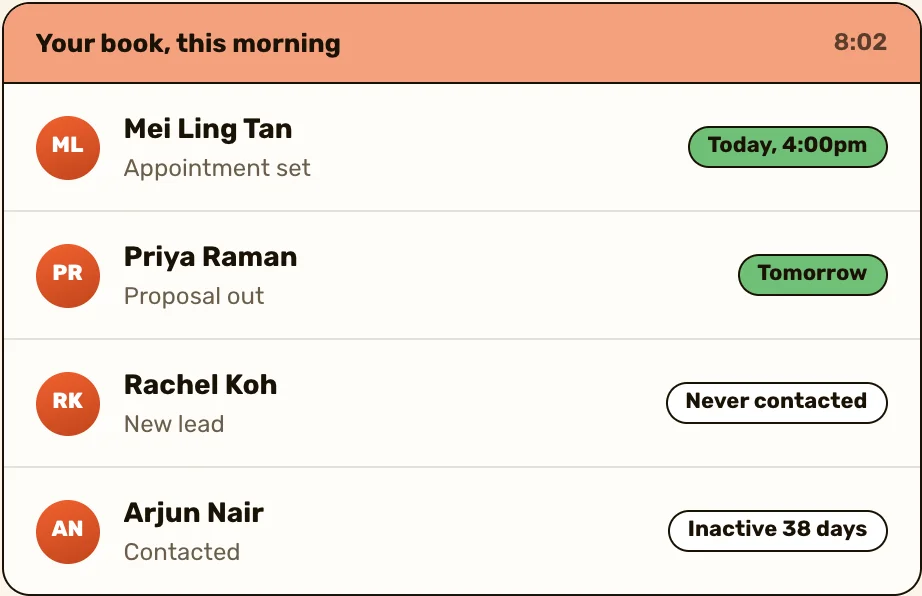
- A label says "follow up", but it won't tell you when the day has arrived.
- Chats aren't a client record. What someone told you three months ago is somewhere up the thread.
- A manager can't see the team's chats, or who's waiting for a reply, without holding each phone.
- Once you're past a few dozen open conversations, the chat list sorts by the latest message, not by who needs you next.
That's where a CRM comes in. What is a CRM? explains what goes in one, and best WhatsApp CRM in Singapore puts six side by side.
Keep reading
- WhatsApp link generator
- Best WhatsApp CRM in Singapore
- WhatsApp broadcasts
- What is a CRM?


Questions people ask
The app is free to download; the platform isn't. Meta charges per template message delivered, and since 1 October 2026 for replies once a number has used its free ones for the month, and the vendor usually adds its own subscription on top.
WhatsApp is for personal chats. The WhatsApp Business app adds a business profile, greeting and away messages, quick replies, labels and a catalogue, on a business number.
Not at the same time. A number runs one of the two apps, but you can move it between them, so most sellers keep their business chats on a second number.
Yes, it does everything normal WhatsApp does, but WhatsApp says there's no need for it if you're not a business. If nearly everyone who messages you is a client, one number on the Business app works; otherwise keep a second number for work.
Four, alongside your main phone, through WhatsApp Web, the Windows or Mac app, a tablet or a companion phone. WhatsApp's features page lists up to 10 devices and agents with Meta Verified.
Only if you need many people answering one number, or software sending messages at scale. One seller replying to enquiries and following up is well served by the free app.
Sources
- WhatsApp for Business, The difference between WhatsApp and WhatsApp for Business, read 25 October 2026
- WhatsApp for Business, Business app features, read 25 October 2026
- WhatsApp Help Center, About WhatsApp Business, read 25 October 2026
- WhatsApp Help Center, About moving between WhatsApp Messenger and the WhatsApp Business app, read 25 October 2026
- WhatsApp Help Center, About linked devices, read 25 October 2026
- Meta for Developers, Pricing on the WhatsApp Business Platform, read 1 October 2026
- Meta for Developers, Onboarding WhatsApp Business app users, read 25 October 2026